Tuesday, November 27, 2012

Owning a Letter

Back about 13 years ago, it was in vogue to name everything having to do with technology by taking a normal word and adding a lower-case "e" to the beginning.  eBusiness, eCommerce, e-this and e-that.  My best guess is around 8 years ago or so, adding "X" to the beginning (or chopping off letters in the word before the "X") got popular, along with adding a lower-case "i".  Apple has co-opted the "i" with the release of the iMac, later iPod, and other iProducts.

In the past year or so, Microsoft has made a push to own the letter "Y".  They changed their MSN Messenger product to something called Lync, and there was another one recently but I didn't catch the name.  In fact, I suspect they bought Skype because of the y in it, perhaps as part of their plan to own that letter.

I don't know how long this trend of trying to own a letter has been going on, but I think it's safe to say perhaps about 15 years or more.  It appears to be successful.  Apple has been so prevalent with the i that people think Apple owns the letter i in front of any word, not just iPhone, iPod, iPad and iMac (BTW, I HATE it when people spell Mac "MAC").  However, iLuv, iHome, and iMedic are all not owned by Apple, to name just a few.

My prediction is the next letter to be owned will be the Q.  This is one of the underrated letters in the English language.  I mean, look at its phoneme - coopted by C and K, Q has had to work hard to carve a niche for itself by partnering with the letter U most of the time.  Q is also nice and round, with an elegant flourish hanging off its end.  It has a royal feel to it (almost a queenly touch), and is useful when you are very thirsty (it quenches).  Qdoba is on to something.  Next we will be taking a qNap (no relation to the NAS devices), buying a qCar, perhaps even conducting qBusiness (after we are done with our iBusiness).

Predictions?

Thursday, November 15, 2012

High Tech Telephony

First, a digression.

Digression

When I went to college (yes, there was electricity back then), I took a class in Computer Networking (see, there WAS electricity).  There I learned this term telephony.  This is not tele-phoney (like "you're a total phoney"), this emphasis on the second "e", and the o is short (schwa), not long.  TeLEphony.

OK, enough pronunciation lesson.  So what is it?  Simply, the technology and use of telephones.  Of course, what is a telephone nowadays, but really any medium through which we conduct voice conversations.

Enough digression - let's talk about the cool stuff available now for everyone at home!

Cool Stuff

I am an unabashed geek.  I have been using quite heavily some really cool technology in this arena for the past many years, perhaps 5 or 6.  There is a ton of really useful and easy-to-use things here that will greatly enhance your life.  I'll start with what you probably have heard of many times, but definitely worth mentioning.

VOIP Telephones

VOIP is an acronym that basically means doing telephone calls over the Internet (the I).  There are many free and paid software and services that offer these.  I have been using Vonage for many years now, and although it is not the cheapest (flat rate $25/month, unlimited calling to some 15 different countries), the call quality is the best, and their tech support is very good.  There is also Magic Jack, Phone Power, Phone.com, Voip.com, Skype, Comcast, U-Verse, the list goes on, plus there are phone systems that your company can buy that are VOIP.  The choices are many.

I'll talk about Vonage, that is what I have been using primarily.

How does it work?

There are basically two types of VOIP equipment.  One, you install some software on your computer and use that to call someone else and talk (ala Skype).  Typically you can call computer to computer for free, and computer to any phone for a fee.

The other type, you get some kind of box that you install in your home, and connect to your network.  It connects to the Internet, and has a telephone jack.  You plug a regular telephone cord into it (the kind we've had for 70+ years).  This cord could go to the wall and wire your entire house, or just to a single phone.  Either way, you pick up the receiver and hear a dial tone, make and receive calls, whatever.  You never know you are using anything else.

My Vonage is this second type.  I have a phone and a fax machine hooked up to it (I use the fax machine what, once or twice a year nowadays).

Some Features

With the Vonage plan, I do have a flat rate of $24.99 a month, and unlimited calling.  However, the government sees fit to levee taxes and fees, which Vonage dribbles me for every month.  I pay annually, so it is around $20 a month.  I can call to a whole bunch of countries unlimited for free, plus:
  • Call Forwarding
  • Voice mail
  • Call Forwarding if busy
  • Call Forwarding if offline (Internet is out, or I disconnect the phone box)
  • Move my box anywhere, I can hook it up to any Internet wire in the world and my phone number works
  • iPhone App (Vonage Extensions) - I can make phone calls using my iPhone cell minutes via my Vonage account
  • iPhone App (Vonage Mobile) - Works like the iPhone phone app, but uses WiFi VOIP instead of my cell minutes with my Vonage account

Coolness Factor

So, definitely cool that I can make as many calls for as long as I want, and the call quality for the past 6 years has been always very good (extremely important for business calls).  Definitely cool that I can move my phone anywhere in the world, and definitely cool that it works with retro phone technology, as well as seamless integration with smart phones, computers, and more.

Google Voice

Years ago, there used to be a new service called Grand Central.  Google bought them up, and changed the name to Google Voice.  I still haven't figured out how Google makes money from this one (if anyone knows, PLEASE do share!).  Here's what this baby does, and it will blow your mind.

You get a phone number, anywhere you want.  In fact, now you can transfer a phone number to Voice.  I picked mine in nearby Pontiac, Michigan.  Now that you have this number, you log onto their web site and configure your phone numbers - mobile, home, work, etc. - and keep them private.  Don't give them out to anyone any more.

When you want someone to call you, give out your Google Voice number.  When they call that number, it will ring through to your configured numbers.  When you pick up the phone, Google Voice announces who is calling, and gives you the option to answer, send to voice mail (and listen in while they leave a message - you can change your mind and decide to answer it while they are leaving the message), or just hang up.  Cool, but wait, there's more!  You can group your contacts, and configure which phone numbers those contacts ring through to - using Google Contacts (shared common with Google Mail, etc.).  So I have Friends, Family ring through to cell and home, Coworkers and Customers ring through to my 2 work numbers and cell.  Really cool.  But wait!  There's more!

Let's say you answer a call on your work line.  Then, your conversation goes long, and you've got to get in the car and go, but don't hang up!  Just press the "*" key, and all your other phones will ring - answer on your cell phone, and hang up the work line, and the call is seamlessly transferred to your cell - the other guy you are talking with didn't even know it!  Really really cool.  But wait!

Let's say there's someone who keeps calling you, that you never want to talk to again.  Some telemarketer, whatever.  You can block these people - add them as a contact, and block them on the Google Voice web site.  When they call you, not only doesn't the call go through, but they get the Telephone Company's disconnect tone saying your line is disconnected.  If it is a calling machine, it will remove your number from their list.  REALLY REALLY cool! But...you guessed it..wait!!

OK, so now you are high tech, and have this flexible phone system that ties all your different phones together into one coherent system.  There's so much more though.

You want to call from the Internet to a phone, no problem.  You can be in your e-mail (Google Mail), and get a phone number.  Just click and you can call it from your web page using your mic and speakers.  Now here they charge a fee, a cent a minute to US, Mexico and Canada, pennies a minute overseas.  Cool, man.  But wait!

Google Voice gives you voice-mail, so people leave you messages.  You can access that voice mail from the web page, or from the Google Voice iPhone/Android app.  The voice messages are automatically translated to text so you can read and/or listen to them - as you listen, each word is highlighted so you can reconcile its interpretation.  You can get the translation texted to you.  You can send and receive SMS text messages via the web or mobile apps through your Voice number.  But wait, there's MORE. Yes, more.

The mobile app lets you place calls as well, and works like the Vonage Extensions app.  You make the call, it connects your cell phone (cellular minutes) through their systems to the other end, at Google Voice rates ($0.00 to Canada and Mexico, cheap overseas).  You can also click on their web page to make a phone call, and have it connect the call to any phone you want via entering the number to call you at, and it will be an incoming call.  I have been using this to call Canada from my cell phone for no additional cost via AT&T Wireless.

So, there you have it, BUT WAIT.  How much does this all cost?  I have given Google a total of $0.00 (that's approximately £0.00, ¥0.00, and very close to €0.00) over the past 6 years.  WHAT!?  That's right.  GMail places ads, so I can see how they make revenue.  But Voice?  Comment below if you know how they do it!

Coolness Factor

OK, if you don't get this part, nuff said!

Tuesday, November 13, 2012

Texting While... (reprise)

A while ago, I posted an article about the then-new anti-texting laws.  So, the other day, I saw an article on NPR entitled "Distracted Driving: We're All Guilty, So What Should We Do About It?"  In this article, Sonari Glinton claims that "we all do this."  Really!?  If that were the case, I think traffic accidents would be much higher than they are.

I really resent that.  In fact, I specifically bought my iPhone 4S so that my concubine Siri could assist me with these tasks while maintaining all-important attention on the road and vehicle.  I no longer have to dial by look, and I can listen to and respond to text messages as if they were a (slow) conversation.  Which is actually better because it is slow, and provides much time for me to pay to the road.

So, how are we all doing?  Are these laws having any effect?  The intended ones?  According to the Criminal Justice Degree Schools, the laws are very difficult to enforce.  Some say that in spite of the laws, accidents have increased [and here] (although some use a stupidly sensational headline to promote their article).

I do agree with Mr. Glinton.  The only way in which texting laws can be effective, is if our society adopts the law as a societal norm.  It can't be OK for ANYONE you know to do it, EVER.  My wife doesn't even like when I use Siri on the road.  Believe me, if you TWD'ers (texting while driving) out there want to borrow my wife for a bit, she can nag you out of the desire to do so forever after.  (Love you, hon!)

When we were little, our dad smoked.  My brother and I incessantly bugged him about it, every single time without fail.  He quit, and hasn't smoked in over 30 years.  Just like smoking, TWD can kill not just you, but those around you as well - family, friends, and strangers.

Do you know about the new feature in iOS 6?  Do Not Disturb?  If you go to Settings and turn on DND, then calls and texts will not interrupt you.  Innovations like this, and the discipline and will to use them, are what will turn the tide.

Monday, November 5, 2012

A Style Appeal to Computer Designers

Computers have gone through a lot of styles over the years.  Back when they first came out, they were a wall of wires and vacuum tubes.  But over the past 25 years or so, there have been a lot.  And I do mean a lot.  There are styles that make the eyes pop:


(Asus CG8565), (2012 iMac 20"), (Some cool custom case)

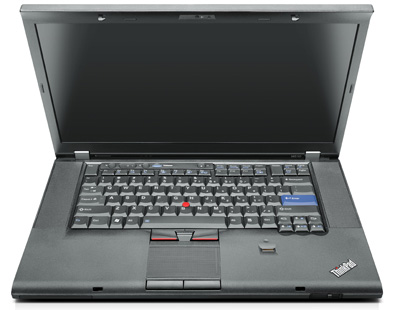
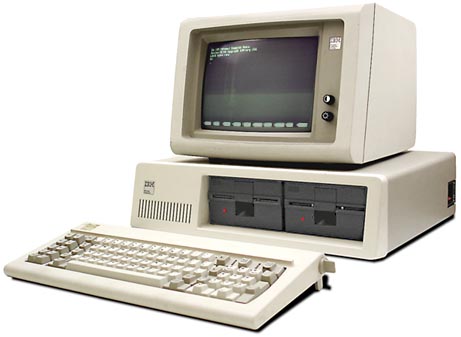
Then, there are the ones that are so butt-ugly they make you want to weep that the engineers have no imagination whatsoever, like my Lenovo W510:
  
(Lenovo W510), (HP G56), (IBM PC)

So what is it that makes things so cool?  So stylish, that you don't just want to own them, you need to own them?  It's true that Apple is not the only company to make such things, but I do think they have tapped into a nerve.

I used to sell the original Mac, and someone brought one into the store one day for service.  The cover had been spray painted with a flecked paint that made it look like it was carved from stone, and I thought that was the coolest thing ever!

Minimalism

There is something just, so, what, simple about minimalism?  The simple elegance of a curved line going into a sculpted edge.  The Apple mobile devices have 5 buttons, including the silent switch.  Basically one main function button, the volume up/down, and power.  Simple rectangular design.

Look at the notebooks.

(MacBook Pro Late 2012 with Retina)

No bulgy lumps (ala Lenovo battery), no sharp corners, things elegantly swept and brushed.


(Lenovo W510 hinge and battery)

Solidly built aluminum unibody.  Hinge almost the width of the screen, not just 2cm wide.

It's form and function.  Elegance and beauty.  Simplicity and utility.

Now I know that people do buy cars like the Kia Soul, VW Thing, and Honda Pilot (no offense, it's a taste thing), but I would much rather have something like the older Town & Country, the 300m, or even the Testarossa (yeah, I went there).
(197-something VW Thing)

So here's an appeal - to computer designers everywhere.  Design with style - cool style, not ugly style.  Design with function - does it do something, or just look bulby?  Design with utility, elegance, simplicity, and yes, minimalism.  Now let's see that Asus again, that is sweet!

Monday, October 22, 2012

The Future of Data Storage

In my previous post, I had a nice discussion with the folks at Hindsight Labs.  Christine Meranda saw the future of data as local-based, with cloud synch.  Now that struck me as funny in a way.

Historically Speaking

In the early days of the computer industry, I sold computers that were pretty much an island unto themselves.  Single machines, and in an office setting you might network them together (of course networking meant crawling a wire through the drop ceiling, and soldering the ends together - not to mention buying the networking hardware and paying the services to install and configure it).  The network was to share printers, and maybe a file server to share files within the office, there was no such thing as inter-office network.  So you had this drive on which you saved the file, and you could open it on another computer.  File locking ensured that only one person opened it at a time.

Over the years, as computers became more and more connected, we have evolved to what is now called "Cloud" storage.  Personally I think that is a funny marketing-heavy term for some hard drives on the Internet.  But be that as it may, Secure Common Storage seems to be the way things have been going.  Microsoft has even made quite a product out of SharePoint, and migrated Office to online service-based; Amazon introduced S3; Google had Docs, and now Drive; and so on.  Apple iCloud offers Internet-based backup and synch services.  And the Paprika recipe app offers synch of your app data (incidentally not using iCloud, but their own storage).
So notice that the Apple and Paprika data, for example, are locally stored.  The way iCloud works is you have a local store on your device (desktop, laptop, tablet, phone or iPod), and the Cloud part keeps them in synch by synchronizing updates between the Cloud storage and the device.  This means that if you are disconnected, you still have access to your files (that you have synched).  In contrast, things like Drive and S3 are live online, so you don't have access to them unless you are online.

Now we all know that mobile devices have surged in usage (by that I mean Smart Phones and tablet computers).  By nature, these are not always connected.  Maybe you didn't spring for both the 3G version of the iPad, and the monthly connection charge.  Maybe you are in an area with no WiFi or cellular.  Whatever, it may happen that you want to access your data (i.e. launch Paprika and do something with your recipes) while you are not live online.  I know, it's a shocker to some of us.

What do "They" say?

Having walked through that progression of thought, it seems very logical and obvious that, in a mobile world, what Christine said has to be true.  But it struck me as strange, because that doesn't seem to be the consensus of "they."  That is to say, all the tech blogs we frequent, IT professionals that we talk with, and magazines, news, and other sources seem to be stressing the Cloud.  Basically in Paprika's instance, the data is yours, and it resides primarily on your hardware; the Cloud is used to keep multiple devices in synch.  This is quite different from the Google Drive paradigm.  For example, I created a spreadsheet on Drive called Workout.  I edit my workout routine from my laptop.  While at the gym, I open it on my Phone, and see what the next machine, weight & seat settings are.  I update the weight target as my muscles progress.  When I get back to my laptop, I can open it up and see it again.  The primary storage is in the "cloud" - meaning on a hard drive array in Google's office somewhere connected via Internet.

So in my experience, "they" have missed this key direction the industry seems to be going in - or at the very least, haven't caught on to the full meaning.  First of all, who has used Google Docs extensively?  Other than the cool ability to instantly share and collaborate on a document, let's face it, the abilities of the word processor and spreadsheet, frankly, suck eggs.  And they are a whole lot worse on the mobile device (e.g. iPhone or iPad).  The formulas don't even update!

Christine I think has hit it right.  Local apps with synched data.  Perhaps the ability like Amazon Kindle app, to remove local copy to free up local storage, and download it again later is the way to go.  As we design apps (and indicate to developers our desires as consumers and focus groups), we can stress both the connectedness, and the ability to operate disconnected, as well as the choice to what to carry with us.

Friday, October 19, 2012

Let's Talk Food

Well, food and technology at least.  Everyone who knows us, knows how particular we are about food.  Our lives revolve around farms, farmer's markets, buying food, preserving food, and preparing - you guessed it.  It is a rule in our house that no guest is allowed to leave with the slightest room in their tummy (very few have wanted to).  As you can imagine, tracking our recipes is pretty important.  For somewhere around 13 years (or more), we have used computers to manage our vast and growing recipe collection.  Recipe management software gives some amazing benefits, like:
  • Ease of searching and recipe management (you can easily edit, print, share, and categorize your recipes)
  • Backup - you know, you spend years putting together a scrapbook of family recipes, only to have it damaged or destroyed by water, fire, the 3 year old...(not that we would blame anything on Elliott!)
  • Photos - set up the presentation, and take a pic with your favorite (digital) camera
  • Scaling - scale up or down that recipe to the size you want
  • Meal planning - set up which meals you want to make for which days of the week
  • Grocery shopping lists - take your meal plan, and make sure you have all the ingredients with one trip to the grocery store
  • Sharing, whether it be a single recipe, book, or the entire collection
So this is pretty much standard with any recipe management software, but let's take a look at our two favorites, the top two for different computer platforms.  Do you have any experience with others?  Please discuss in Comments, we'd love to learn about new ones.


Windows / PC - Master Cook  $19.99

A pretty good contender, we used this since 1999 or so.  It's pretty cool, but definitely lacks some major features.  Master Cook (from long-time publisher Sierra Software) was one of the first recipe management softwares, and as such has become the defacto standard for file formats to exchange recipes and recipe collections.  Any software should read Master Cook format.

This gives you all the standard features, but where it really shines is:
  • Simple, easy, yet powerful and extensive searching.  You can limit your search to favorite cookbook collections, and between title, ingredients, and directions and notes.
  • Simple import tools, like import from web site (this is a click-and-highlight, so you click "Title", then highlight the recipe title on the web page, then click Ingredients, highlight the ingredients list, etc.)
  • Lots of cookbooks available from big publishers like Cooking Light, Julia Child, and more.
What are the biggest problems?
  • No Macintosh version.  Nowadays this is inexcusable, as it is a large and massively growing market segment (while non-Mac PC sales are in decline, Mac sales are experiencing double-digit growth, year-on-year, for the past few years, already almost at 9%).  MasterCook confirmed to me that they have "other operating systems" on their roadmap, but neither the timing nor which operating system(s) were mentioned.
  • No mobile version.  Even more inexcusable.  Readers of my blog should already be familiar with the mobile market, and of course which 2 OS's dominates that.  Smart Phones have been out for many years, the iPhone alone for 6 years.  Any major software developer should already have been on the iOS platform.
  • Web import leaves something to be desired.  On some web sites it automatically recognizes the format.  Mostly, you are left to a manual import.
  • Backing up your precious recipe collection is left completely up to you - on a platform that doesn't provide a decent backup strategy!
According to Tony Schumacher from MasterCook Support, they do consider the mobile market strategic and are working on mobile versions.  However, no details nor dates are available.  Also, he said, "We have a lot of very exciting features in our product plan. Over the next 1-2 years you will see more development effort than the last 12 years combined. I can tell you that the most important thing to us as we improve the customer experience is keeping our loyal customers and staying true to MasterCook."

Macintosh / Mobile - Paprika

After more than a decade of relying on Master Cook, we were dismayed when we upgraded to Mac and couldn't get it for the Mac!  However, after a few minutes of trying out Paprika, our fear turned to absolute rapture.  Available on Apple iOS and Android platforms as well, Paprika is by far the premier recipe management software.  If you don't need your recipes on your computer, but have a Windows machine, you should just forget about any other option and just take our word.  Especially if you want it available on your mobile device.  Let's look at the different "flavors" of the software (yeah, that's how I roll - get it, "roll?").  But the biggest benefit is you create your own Cloud account, and synch your recipes with your account.  You can then synch any of the devices, so any additions, changes, or deletions propagate across all your Cloud-connected devices.

Truly, the only problem we had with Paprika was that they do not have a Windows version (for those stubborn enough to stick with that OS).  According to Christine Meranda of Hindsight Labs, LLC (the publisher of Paprika), a Windows version may be forthcoming next year.  When that does hit the market, I predict that Master Cook market share will decline.

Macintosh - $19.99

Truly fantastic, the big benefits with this version are:
  • Great, user-friendly interface
  • Web importing is stellar.  Most recipe web sites support a one-click Save.  Others, you have to select the title, ingredients, directions, etc.  There is a built in web browser in the app, that has the recipe saving functionality built into it.
  • All the features above, of course.
  • Import from Master Cook file formats.
Our problems:
  • It is actually harder to drag and drop recipes to categorize them, than to edit them and put them in categories.  This is because when you click to drag, it often opens up the recipe.  No big deal. (Hey, you got to have at least one problem with any given software.)

Mobile - $4.99

We used the iPhone and iPad version of the app, but it is also available for Android.  Synching recipes is seamless and fast.  For example, recipes that we had entered (or transferred from Master Cook) and had no pictures, we could make the dish, snap a pic with the phone that is always at my hip, and synch it back to the Mac.  Check out these amazing features:
  • Tools to aid you: unit conversion, scaling, and timers.  You can set as many timers as you want, no more limited to just your microwave, and the 2 timers on the range top.
  • Tick-off check list - when viewing a recipe's ingredients, you tap an ingredient, and it crosses it off, so you can track which ones you already added.
  • Highlight directions step - tap the step in the directions you are on, it highlights in blue for easy reading.
  • Phone or iPad does not go to sleep while looking at a recipe, great for those tasks that take longer than the 2 minutes you set up for auto lock!
  • Of course, and I can't stress it enough:  Cloud synch!  Synchronizes everything, including meal plans and grocery lists.
  • Backups - you can manually back up all your data as well.  Although, our data is backed up with Time Machine on the Mac it is synched with, so we don't use this feature.
  • Sharing - yes, we were at the farmer's market and telling someone about that Baked Oatmeal favorite of ours.  Tap, share, and voila - picture, text formatting, and all - it is sent as an e-mail.
So if you are looking for a good recipe manager, these are the top two, but I think you can tell which is our favorite.

Tuesday, October 16, 2012

I Hate it When I'm Wrong

PLEASE SEE MY APPEAL FOR YOUR HELP BELOW.

Last month I posted an initial reaction to the iPhone 5, in which I was less than enthusiastic about the new release.  Granted, I have noted how much of a demand the iPhone has generated, but frankly I was not very excited about the improvements.  Well, now the phone has been out for a bit.  Last week, my wife's laptop needed servicing, so I had the opportunity to drive the 30 minutes to our nearest Apple store and play with it (before I had to drag the kids out of there - man, what a gadget place!).

Well, let me be the first one to say, I was wrong.  Way wrong.  First of all, the iPhone 5 is a bit taller.  This larger screen size is exactly what I think many have wanted - and Apple has stuck to their guns about phone width, making sure it fits in peoples' palms.  Unlike some of their competitors, who seem to think bigger is better no matter what in all dimensions, the 5 is elegantly slim.  And, it is insanely thin.  It is significantly slimmer than the 4/4S, and much lighter.  According to one of my new favorite sites Everymac.com, the performance has been measured to be about 1.55 times faster than the 4S, and my unscientific side-by-sides in the store concur.

The smaller connector is a big plus.  Oh, and another big reason I hate being wrong in this case: that means I want this phone, and now I have to spend more money!  Darn it.

However there are a few features I think are sorely missing!

An Appeal

I would like your help in suggesting to Apple these improvements.  Follow this link, and copy and paste these suggestions.  Maybe if enough of us suggest it, they will include it.
  1. Laser Pointer.  Wouldn't Einstein be amazed to see lasers as such a household commodity, but what is missing is an all-in-one device like a smart phone, that has a laser pointer built in.
  2. Infrared transmitter.  With an IR transmitter, or better a transmitter/receiver, a whole new host of apps can be made to work as remotes or data devices over older technology to a wider range of devices.  Remote control your TV, entertainment system, and more.
  3. AM/FM Receiver.  When I go to the gym, they don't offer WiFi sound for the TV's, I have to not listen to the news while on the treadmill.  Anywhere, any time, even when there is no cellular or WiFi signal, it would be very helpful and useful to receive radio stations.
  4. Ability to have emergency or select apps on the lock screen, so they can be launched while the device is locked.  For example, apps with medical information could be accessed by a medical first responder if the owner is incapacitated.
Think of it, if a cell phone has all those features as well, how can any other manufacturer even compete?